


Miner GO!
4.589.00 Reviews
App Specs
- Version
- 0.1.4
- Updated On
- License
- Free
- Downloads
- 50,000+
- Developer
- Seikami
- Categories
- Arcade
- Platform
- Android
Screenshots
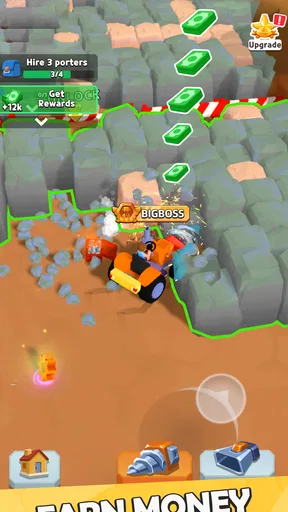
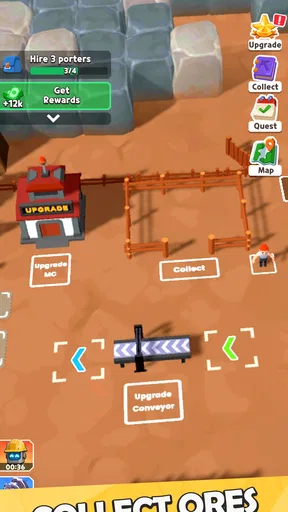
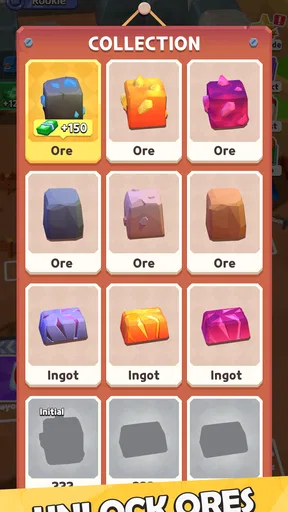
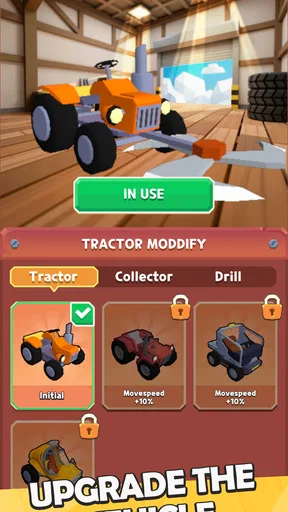
 Analysis by AppCompare
I approached Miner GO! as the sort of arcade game that can sit on a shared phone and invite a quick turn without demanding a long explanation. Its basic appeal is easy to understand: dig for resources, sell what you collect, and improve the mining operation so the next run feels more productive. After spending time with it, I found that the real question is not whether the idea is accessible—it is—but whether you enjoy repeating a compact upgrade loop and making small decisions about progress.
That makes this a particularly interesting choice for a household or any shared-device situation. One person can make progress in a short session, hand over the phone, and let someone else continue the operation. There is no need to remember a complicated story or master a large control scheme before having fun. At the same time, shared use works best when everyone agrees on how upgrades and spending should be handled, because the game is built around a single ongoing mining project rather than clearly separated personal profiles.
How Miner GO! works when several people share one device
When several people share one device, I’d treat the mine as a group project rather than assume everyone has a separate space. Before handing it over, agree who can spend the resources and what the next upgrade goal is; that keeps a quick turn from undoing someone else’s plan. A simple handover—what was collected, what was sold, and what comes next—makes the shared loop easier to follow.
A simple loop that is easy to pass around
The central routine is deliberately clear. I dig, gather resources, sell them, and use the proceeds to improve the rig. Then I repeat the process with a stronger setup. This is a familiar arcade structure, but it works here because each action has an obvious purpose. Digging is not an isolated mini-game; it feeds the selling step, and selling gives meaning to the next upgrade.
On a shared phone, that clarity matters. A younger player can understand that collected material becomes money, while a more experienced player can think about whether the next improvement should make the current cycle smoother or prepare for longer-term progress. The game therefore supports different levels of involvement without requiring separate rules for each person.
A practical household routine would be to let one player complete a short mining session, then pause before making a major upgrade. The next player can review the available choices and decide together with the first player. This prevents the common shared-device problem where someone opens a game and discovers that the saved progress has changed in a way nobody discussed.
What the shared-device setup does not solve automatically
The convenience of passing the phone around should not be confused with account separation. I would treat the current operation as one shared save space unless the game itself presents a clear way to create different profiles. That means a family should not assume that each person can keep an independent mine, preserve personal upgrade choices, or undo another player’s decisions.
Worth Reading Before You Choose

Switching to Android Auto Means Rethinking Your Driving Routine

Google Calendar Makes a Crowded Week Easier to Manage

Baby Panda World Brings Quick Play to Modern Phones, but Its Game Library Feels Busy

ESPN’s Live Game View Makes Following Close Games Easier

QuizzLand Review: A Good Fit for Short Trivia Breaks, Not Every Player

Basketball Stars: Multiplayer Is Fast, but Can It Recover When Matches Go Wrong?
For that reason, the best arrangement is simple coordination rather than complicated rules. Decide who is allowed to spend accumulated resources, and agree on whether the goal is fast progress, balanced upgrades, or simply experimenting. If one person wants to optimize every decision while another only wants to tap through a relaxing session, a common save can become a source of friction.
I also recommend keeping purchases separate from ordinary play. Miner GO! is free to start, but it includes in-app purchases priced at $4.99 per item. On a shared device, the person holding the phone may not be the person responsible for payment. Adults should handle purchase approval directly and avoid treating the in-game currency or upgrade flow as permission to spend household money.
Setting boundaries before the first mining session
The game carries an Everyone content rating, which makes its general tone suitable for a broad audience. That is useful for a family device, but an age rating does not replace supervision around spending, screen time, or shared progress. I would explain those boundaries before handing over the phone, especially if a child is likely to interpret every visible upgrade as something that should be bought immediately.
A good boundary is to separate three kinds of decisions. Routine digging can be open to anyone. Spending the resources earned through play can require agreement. Real-money purchases should remain an adult decision. This approach keeps the game playful while making the financial boundary unmistakable.
It is also worth agreeing on a stopping point. The upgrade structure naturally encourages “one more run” because the next improvement is always visible as a goal. In a household setting, that can be motivating, but it can also make handover awkward if someone feels they are being interrupted just before reaching the next milestone. A timer or a clearly agreed number of runs is more practical than relying on willpower at the end of a session.
Coordination makes the upgrade loop more interesting
When I play alone, I can make an upgrade immediately and accept the consequences. With several players, the same choice becomes a small planning exercise. One person may prefer an improvement that makes the next few minutes feel faster, while another may want to save for a larger change. That disagreement is not a flaw in the controls; it is a natural result of turning one progression system into a shared activity.
My preferred method is to make the resource plan visible. Before spending, say what the group is saving toward and why. If the next upgrade is close, continue collecting until it is affordable. If progress feels slow, choose a smaller improvement and use the next session to reassess. This avoids the vague feeling that resources simply disappeared and gives younger players a straightforward lesson in delayed rewards.
There is also a useful handover habit: the outgoing player should say what was collected, what was sold, and what the current goal is. That takes only a moment, but it avoids duplicate effort and helps the next player understand the state of the rig. In my experience, this kind of verbal coordination adds more value to shared play than trying to enforce a rigid turn order.
Where the arcade design feels strongest
Miner GO! is at its best when I want a focused activity rather than a large world to explore. The mining theme gives the repeated actions a satisfying direction, and the upgrade loop provides a reason to return after a short break. I do not need to remember a plot, assemble a team, or study a long tutorial before making progress.
That simplicity also makes it approachable for people who do not normally play games. Someone can understand the fantasy of operating a mining rig without knowing genre terminology. The actions have a practical relationship: collect something, convert it into value, and improve the tool that helps collect more. For a shared household device, that is a stronger advantage than a complicated feature list would be.
The game is also a reasonable fit for players who like incremental progress. If you enjoy watching a modest operation become more capable through repeated decisions, the loop has an immediate rhythm. The satisfaction comes less from a dramatic event and more from noticing that the same task gradually becomes more rewarding or manageable.
Where it may lose momentum
The same repetition that makes the game accessible can limit its appeal. If you need constant changes in scenery, a deep narrative, competitive multiplayer, or a large variety of mechanics, this compact arcade approach may feel narrow. The mining theme gives the loop identity, but it does not automatically make every cycle feel different.
I would also be cautious about recommending it to someone who dislikes incremental systems. The game asks you to repeat the core activity in order to improve the operation. That is the point, not a temporary phase before the “real” game begins. Players who prefer a defined ending or a sequence of handcrafted challenges may find a level-based arcade alternative more satisfying.
Another trade-off appears on a shared device. A solo player can follow a personal strategy, while a household group may compromise constantly. That can be enjoyable if the group likes discussing choices, but frustrating if one person wants control of the entire plan. In that case, a game with separate profiles or independent short challenges would be a better fit.
Version, access, and everyday practicality
Miner GO! is a free arcade game from Seikami, currently at version 0.1.4. It supports devices running Android 7.1 or later, so compatibility should be checked before installing it on an older household phone or tablet. The low entry cost makes it easy to try without committing money upfront, although the optional $4.99 purchases mean the free starting point should not be mistaken for a completely purchase-free experience.
The game was released on January 3, 2026, and its audience is already visible through over 50 thousand installs. Its average rating is 4.4 from around 748 ratings, with 89 written reviews. I see those figures as a sign that the basic idea is connecting with players, but not as a guarantee that every household will enjoy the same pace. Ratings can tell me that the loop has appeal; they cannot remove the need to decide whether repetitive upgrading suits the people sharing the device.
For an everyday scenario, imagine a family waiting for an appointment with one phone available. One person can dig for a few minutes, another can sell and inspect the next improvement, and a third can decide whether to continue or stop. The game fits that situation better than a long narrative adventure because nobody needs a large uninterrupted block of time to understand what is happening.
How it compares with other arcade choices
Compared with a reflex-focused arcade game, Miner GO! places more weight on planning and accumulation. The immediate action is only half of the experience; the other half is deciding how the proceeds should improve the rig. That makes it less suitable for someone who wants instant rounds with a clear score and more suitable for someone who enjoys seeing decisions carry forward.
Compared with a large simulation or management game, it is much easier to pick up. You are not asked to manage a complex organization, learn a detailed economy, or monitor many systems at once. The trade-off is depth. A dedicated management game may offer more control over production, staffing, logistics, or long-term strategy, while this title keeps the focus on the satisfying arcade-sized loop.
Compared with an idle miner, the appeal is likely to depend on how much direct involvement you want. Miner GO! is a better choice when you want to participate in the digging-and-selling rhythm rather than simply check a number that has grown in the background. If your ideal game is something that progresses mostly while you are away, an idle alternative may be more convenient. If you want each short session to include an action and a decision, this one has the clearer hands-on role.
Who should install it, and who should skip it
I would recommend Miner GO! to players who like compact arcade sessions, visible upgrades, and straightforward resource decisions. It is especially well suited to a shared device where several people can take turns with one operation, provided everyone understands that progress and spending choices may be shared.
It is also a good starting point for someone who finds larger simulation games intimidating. The mining theme gives the progression a concrete shape, and the basic loop can be explained in ordinary language. A parent, sibling, or friend can join without first learning a complicated control system.
I would skip it if your priority is a rich story, distinct stages, deep competitive play, or a wide range of activities. I would also choose something else for a household that needs guaranteed personal save spaces, because shared progress can be inconvenient when players have very different goals. Finally, anyone sensitive to optional purchase prompts should involve an adult from the beginning rather than treating the free download as the end of the decision.
My household verdict
Miner GO! works because it keeps its promise focused: operate a mining rig through repeated digging, selling, and upgrading, then decide whether the next improvement is worth pursuing. I like that the loop is understandable within moments and still gives me a reason to think about the next move. Its strongest household quality is not complexity but accessibility; different players can contribute at different levels.
My main reservation is that shared play requires trust and coordination. The Everyone rating helps with the general audience, but it does not create separate account boundaries, settle upgrade disagreements, or prevent an accidental purchase. Families and roommates should establish those rules themselves before the first session.
Overall, I see this as a pleasant free arcade option for a shared Android device, particularly when the group enjoys small goals and gradual improvement. It is not the right replacement for a deep simulator or a fast competitive game, but it fills a useful middle ground: more purposeful than a purely reflex-based title, lighter than a full management game, and easy to hand from one player to the next. If your household can agree on turns, spending, and the next upgrade, the simple mining loop becomes a surprisingly effective shared pastime.
Pros
- Simple controls make it easy for beginners to start mining.
- Short sessions work well for quick play on mobile devices.
- Progression gives players a clear reason to return regularly.
- The colorful visual style keeps the gameplay approachable and friendly.
- It can be enjoyed casually without requiring advanced gaming skills.
Cons
- Mining tasks may become repetitive after extended play sessions.
- Progress can feel slow without frequent upgrades or bonuses.
- The small-screen interface may feel crowded on some phones.
- Some features may depend heavily on an active internet connection.
- Players seeking deep strategy may find the mechanics too limited.
FAQs for Miner GO!
What is Miner GO! and how is the gameplay?
Miner GO! is a casual mining game focused on digging, collecting valuable resources, and improving your equipment. During my review, the gameplay felt easy to understand, with short sessions that work well for quick breaks. You generally progress by mining deeper, gathering materials, upgrading tools, and unlocking new areas, while managing your resources to keep improving steadily.
Is Miner GO! free to download and play?
Miner GO! can generally be downloaded and played without an upfront purchase, making it accessible to most users. However, free-to-play games may include optional in-app purchases, advertisements, or limited resources that encourage players to spend money. Before downloading, check the store listing for the current pricing details, available purchases, and any restrictions that may affect progression.
Does Miner GO! require an internet connection?
The connection requirements can vary depending on the version and the features enabled by the developer. Basic mining gameplay may work without a constant connection, but advertisements, cloud saves, rewards, events, or purchases could require internet access. I recommend launching the game offline after installation to see which functions remain available on your particular Android or iOS device.
Are there advertisements or in-app purchases in Miner GO!?
Miner GO! may use advertisements and optional in-app purchases as part of its free-to-play model. Ads can sometimes provide bonus rewards or additional resources, while purchases may speed up upgrades or reduce waiting times. You should review the payment information in the official app store, especially if children use the device, and enable purchase authentication when appropriate.
Is Miner GO! suitable for children and low-end devices?
Miner GO! uses a straightforward concept and is likely easy for younger players to understand, although parents should still check its advertising, purchase options, and privacy details before allowing independent play. Performance depends on the device and operating-system version. On older phones, lowering visual settings, closing background apps, and maintaining free storage may help reduce slowdowns or crashes.


